Introduction
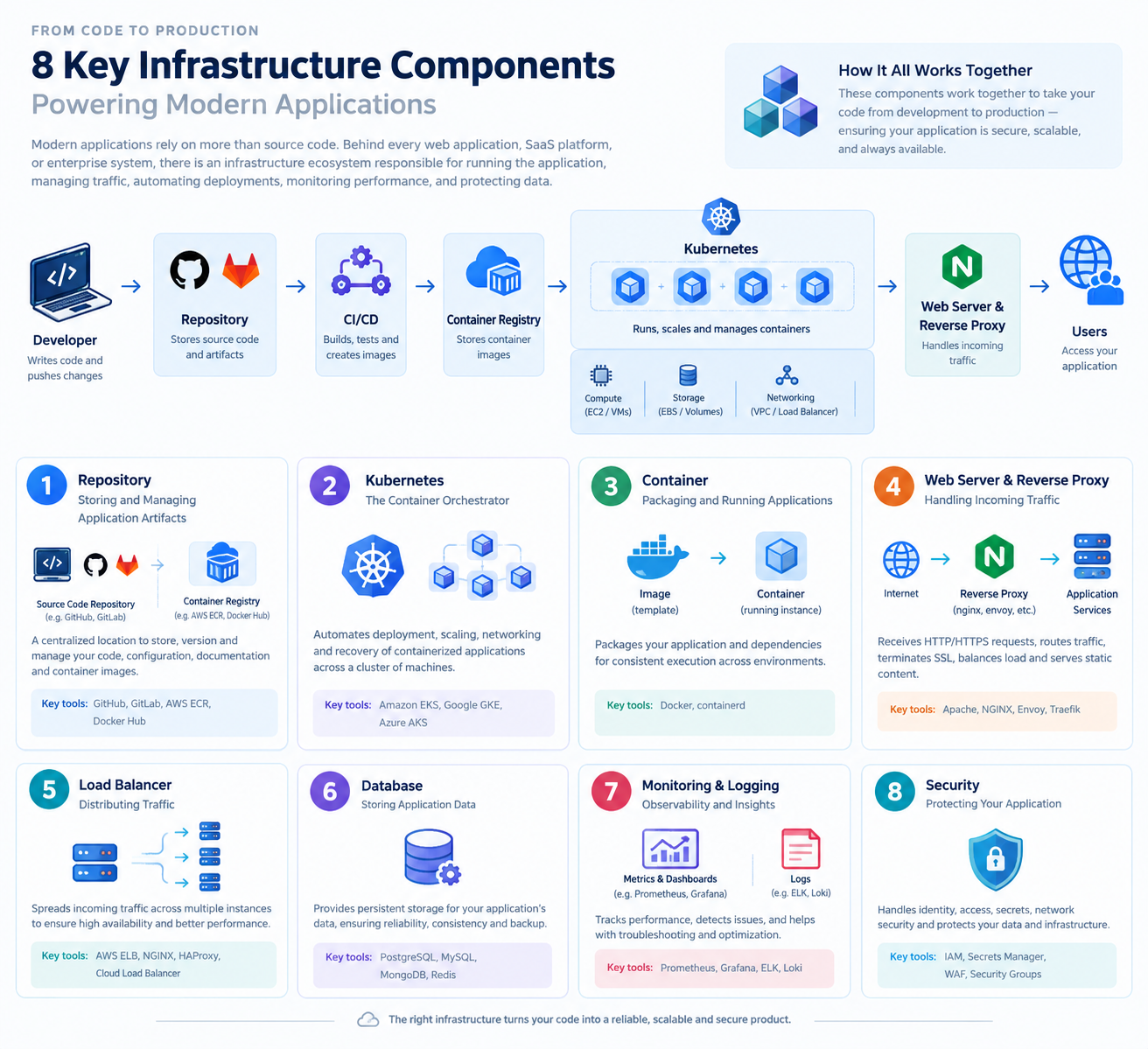
Modern applications rely on more than source code. Behind every web application, SaaS platform, or enterprise system, there is an infrastructure ecosystem responsible for running the application, managing traffic, automating deployments, monitoring performance, and protecting data.
Understanding infrastructure components is essential for software engineers, DevOps engineers, cloud architects, and product managers who need to understand how software moves from development to production.
This article explains eight fundamental infrastructure components, their responsibilities, popular tools, and how they work together to deliver reliable and scalable applications.
1. Repository: Storing and Managing Application Artifacts
A repository is a centralized location where teams store, version, and manage software assets. The type of repository depends on what is being stored.
There are two important categories:
Source Code Repository
Stores application code, configuration files, documentation, and infrastructure definitions. It supports version control, collaboration, code reviews, and change history.
Examples:
- GitHub - GitLab
Container Image Registry
Stores versioned container images that package applications and their dependencies. These images can later be downloaded and executed by container runtimes.
Examples:
- "AWS Elastic Container Registry (ECR)" (https://aws.amazon.com/ecr/) - "Docker Hub" (https://hub.docker.com/)
How it works:
A developer pushes code to GitHub. A CI/CD pipeline builds the application, packages it into a Docker image, and pushes that image to a container registry such as AWS ECR. The deployment platform then pulls the image to run the application.
Key distinction: GitHub primarily stores source code, while ECR and Docker Hub store container images. These are complementary services, not direct equivalents.
2. Kubernetes: The Container Orchestrator
Kubernetes is an open-source container orchestration platform. It automates the deployment, scaling, networking, and recovery of containerized applications across a cluster of machines.
Instead of manually managing every application instance, teams define the desired state of their applications and let Kubernetes work to maintain it.
Key responsibilities include:
- Deployment: Running the required application replicas. - Self-healing: Restarting failed containers and replacing unhealthy application instances. - Scaling: Increasing or decreasing application replicas based on configuration or workload. - Service discovery and networking: Allowing application components to communicate. - Rolling updates: Deploying new versions while controlling service disruption.
Popular managed Kubernetes services include:
- "Amazon EKS" (https://aws.amazon.com/eks/) — Amazon Web Services. - "Google GKE" (https://cloud.google.com/kubernetes-engine) — Google Cloud. - "Azure AKS" (https://azure.microsoft.com/products/kubernetes-service) — Microsoft Azure.
Example: If a web application needs three running replicas, Kubernetes can maintain that desired count. If a replica fails, Kubernetes attempts to replace it.
Kubernetes is not a container itself. It manages workloads that run inside containers through compatible container runtimes.
3. Container: Packaging and Running Applications
A container packages an application and the libraries, dependencies, and configuration required to run it. Containers provide process isolation while sharing the host operating system's kernel.
Containers help reduce the classic problem of software behaving differently across development, testing, and production environments.
Important technologies include:
- Docker: A widely used platform and toolset for building, packaging, and running containers. - containerd: A container runtime responsible for managing container lifecycle operations, including image handling and container execution.
A typical container workflow involves building an image, storing it in a registry, and running an instance of that image on a host.
For example, a Node.js API can be packaged into a container image with its required dependencies. The same image can then run in a developer's environment, a testing environment, or a production cluster.
Container vs. container image:
- An image is the packaged template. - A container is a running instance of that image. - A container runtime manages the execution and lifecycle of containers.
Docker and containerd are related technologies, but they serve different roles within the container ecosystem.
4. Web Server and Reverse Proxy: Handling Incoming Traffic
A web server receives HTTP or HTTPS requests and returns responses. Depending on its configuration, it can also act as a reverse proxy, forwarding requests to application services.
Common technologies include:
- Apache HTTP Server: A mature, general-purpose web server with a broad module ecosystem. - NGINX: Commonly used for serving static content, reverse proxying, load balancing, and handling high volumes of connections. - Envoy: A proxy designed for modern service-to-service communication, observability, and advanced traffic management. - Traefik: A reverse proxy and application-aware edge router that integrates with platforms such as Docker and Kubernetes.
Typical responsibilities include:
- Terminating HTTPS connections. - Routing requests to the correct application. - Distributing traffic across multiple instances. - Serving static assets. - Applying routing rules, timeouts, and other traffic controls.
Example: A request to "api.example.com" reaches a reverse proxy, which forwards it to the appropriate backend API running in a container.
These technologies overlap, but they are not identical. The right choice depends on the application's architecture, traffic patterns, and operational requirements.
5. Host: Providing Compute Resources
A host provides the computing resources needed to run applications and infrastructure software. It may be a physical server or a virtual machine.
Hosts provide resources such as:
- CPU for processing. - Memory for application execution. - Network interfaces for communication. - Disk storage for operating system files, application data, and temporary files.
Popular cloud infrastructure providers include:
- "Amazon EC2" (https://aws.amazon.com/ec2/) — virtual machines on AWS. - "Google Compute Engine" (https://cloud.google.com/compute) — virtual machines on Google Cloud. - "DigitalOcean" (https://www.digitalocean.com/) — cloud infrastructure, including virtual machines called Droplets.
In a Kubernetes environment, worker nodes provide the compute capacity on which application pods are scheduled. These nodes may be virtual machines managed by a cloud provider.
Example: A company runs its application containers on EC2 instances managed as part of an EKS cluster.
It is important to distinguish a host from a Kubernetes cluster. The host supplies compute resources, while Kubernetes coordinates application workloads across the cluster.
6. DNS: Connecting Domain Names to Infrastructure
The Domain Name System (DNS) translates domain names into records that clients can use to locate services.
Instead of requiring users to remember an IP address, DNS lets them access an application through a human-readable domain such as "example.com".
Popular DNS providers and domain registrars include:
- "GoDaddy" (https://www.godaddy.com/) - "Namecheap" (https://www.namecheap.com/) - "Cloudflare" (https://www.cloudflare.com/)
DNS-related services can include:
- Domain registration. - DNS record management. - Routing domain names to IP addresses or other hostnames. - Health-aware or policy-based traffic routing, depending on the provider.
Common DNS record types include:
- A: Maps a hostname to an IPv4 address. - AAAA: Maps a hostname to an IPv6 address. - CNAME: Maps one hostname to another hostname. - MX: Specifies mail servers for a domain. - TXT: Stores text information used for verification and other purposes.
Example: When a user opens "app.example.com", DNS resolution helps the browser locate the service's network endpoint. The browser then connects to that endpoint using HTTP or HTTPS.
DNS does not host the application itself. It helps clients discover where the application can be reached.
7. CI/CD Pipeline: Automating Software Delivery
Continuous Integration and Continuous Delivery or Deployment (CI/CD) automate the process of validating, building, testing, and releasing software.
Without CI/CD, teams may rely on manual steps that are slower, harder to reproduce, and more vulnerable to human error.
Popular tools include:
- "GitHub Actions" (https://github.com/features/actions) - "GitLab CI/CD" (https://docs.gitlab.com/ci/) - "Jenkins" (https://www.jenkins.io/)
A typical pipeline includes:
1. Code change: A developer pushes code to the source repository. 2. Validation: Automated checks, linting, and tests run. 3. Build: The application is compiled or packaged. 4. Containerization: A container image is built when applicable. 5. Publish: The image is pushed to a container registry. 6. Deployment: The new version is released to a target environment. 7. Verification: Health checks and automated tests confirm that the deployment is functioning correctly.
For example, a GitHub Actions workflow can build a Docker image, publish it to AWS ECR, and initiate a deployment to Amazon EKS.
A CI/CD pipeline does not have to deploy every change directly to production. Teams can introduce approvals, testing environments, staged rollouts, and rollback procedures to manage risk.
8. Monitoring, Logging, Backup, and Storage
This area covers several distinct responsibilities. Monitoring and logging help teams understand system health, while backup and storage services help preserve and recover data.
8.1 Monitoring and Observability
Monitoring tracks metrics and system health. Observability combines metrics, logs, traces, and contextual information to help teams investigate unexpected behavior.
Common tools include:
- Prometheus: Collects and stores time-series metrics. - Grafana: Visualizes metrics and other data through dashboards and supports alerting. - ELK Stack: Elasticsearch, Logstash, and Kibana, commonly used for log ingestion, processing, search, and visualization. - Datadog: A monitoring and observability platform covering infrastructure, applications, logs, and other telemetry.
Useful indicators include:
- CPU and memory utilization. - Request latency and error rates. - Application availability. - Database performance. - Failed deployments and container restarts.
Example: If API response times increase after a release, dashboards and logs can help the team identify whether the issue comes from the application, database, or infrastructure.
Monitoring does not automatically fix every problem. Effective alert thresholds, ownership, and incident-response procedures are also necessary.
8.2 Backup and Storage Management
Storage services keep application data, files, backups, and other persistent information. Backup tools help recover data and application state after accidental deletion, system failures, or other incidents.
Relevant technologies include:
- "Amazon S3" (https://aws.amazon.com/s3/) — object storage for files, backups, logs, and other data. - "Velero" (https://velero.io/) — a tool for backing up and restoring Kubernetes resources and, when appropriately configured, persistent volume data.
Storage and backup are related but different concepts. Storing data in a service does not automatically mean that a complete, recoverable backup strategy exists.
A robust strategy should define:
- What data and resources must be backed up. - How frequently backups run. - How long backups are retained. - Where backup copies are stored. - Who can access or delete them. - How often restoration is tested.
For Kubernetes workloads, Velero can help protect cluster resources and supported persistent storage. Amazon S3 can serve as a backup destination, depending on the configuration.
Example: A team backs up Kubernetes resources and persistent volume data to an appropriate storage location, then periodically tests restoration to verify that the application can recover.
How These Components Work Together
Consider a SaaS application deployed on AWS using Kubernetes.
1. Developers store application source code in GitHub. 2. A CI/CD pipeline validates the code and builds a container image. 3. The image is published to Amazon ECR. 4. Amazon EKS schedules and manages the application's containerized workloads on compute nodes. 5. NGINX, Envoy, Traefik, or another suitable entry-point component routes incoming traffic. 6. DNS directs users toward the application's public endpoint. 7. Prometheus and Grafana monitor system performance, while a logging platform helps investigate errors. 8. Amazon S3 stores appropriate application files or backup data, and Velero can help back up Kubernetes resources and supported persistent data.
The exact architecture varies. Some applications do not need Kubernetes, some use managed application platforms, and others use serverless services or simpler virtual-machine deployments.
Conclusion
Infrastructure is not a collection of unrelated tools. It is a system of interconnected components, each responsible for a specific part of delivering and operating software.
Understanding the distinction between source repositories and image registries, containers and orchestration, hosts and clusters, DNS and web servers, and storage and backup is fundamental to designing reliable systems.
The best infrastructure is not necessarily the most complex one. It is the simplest architecture that meets the application's requirements for reliability, security, scalability, maintainability, and cost.