AI-powered development tools are changing how software products are built. Today, you can describe an idea in plain English and use tools such as Claude Code, ChatGPT Codex, Lovable, Cursor, or other AI coding assistants to turn it into a working application.
But there is a problem: describing what you want is not the same as specifying how the product should work.
You might ask AI to build a fleet management system, CRM, booking platform, or SaaS application. It may generate attractive screens quickly, but the result can still have missing features, inconsistent workflows, unreliable data, or security problems.
The solution is to provide AI with clear, structured technical requirements before asking it to build your product.
You do not need to become a software engineer. You need to understand what information AI requires to build the right product.
This guide explains how to do that, step by step.
1. What Are Technical Requirement Specifications?
Technical Requirement Specifications, or technical specs, describe how a software product should be structured, what it must do, how its components interact, and what conditions it must satisfy.
Think of building software like constructing a house.
You can tell an architect, "I want a modern house with three bedrooms." That communicates your vision, but it does not specify the electrical system, plumbing, structural design, room dimensions, or safety requirements.
Software works in a similar way.
What you tell AI
What AI still needs to know
Build a CRM
What information does each customer record contain?
Add user accounts
Who can register, and what can each user do?
Create a dashboard
Which metrics should appear, and how are they calculated?
Add reports
What data should reports include, and can users export them?
Make it secure
How are users authenticated, and how is access restricted?
Make it scalable
What architectural decisions are needed to support future growth?
A technical specification translates your business idea into instructions that AI can use to build a consistent, maintainable product.
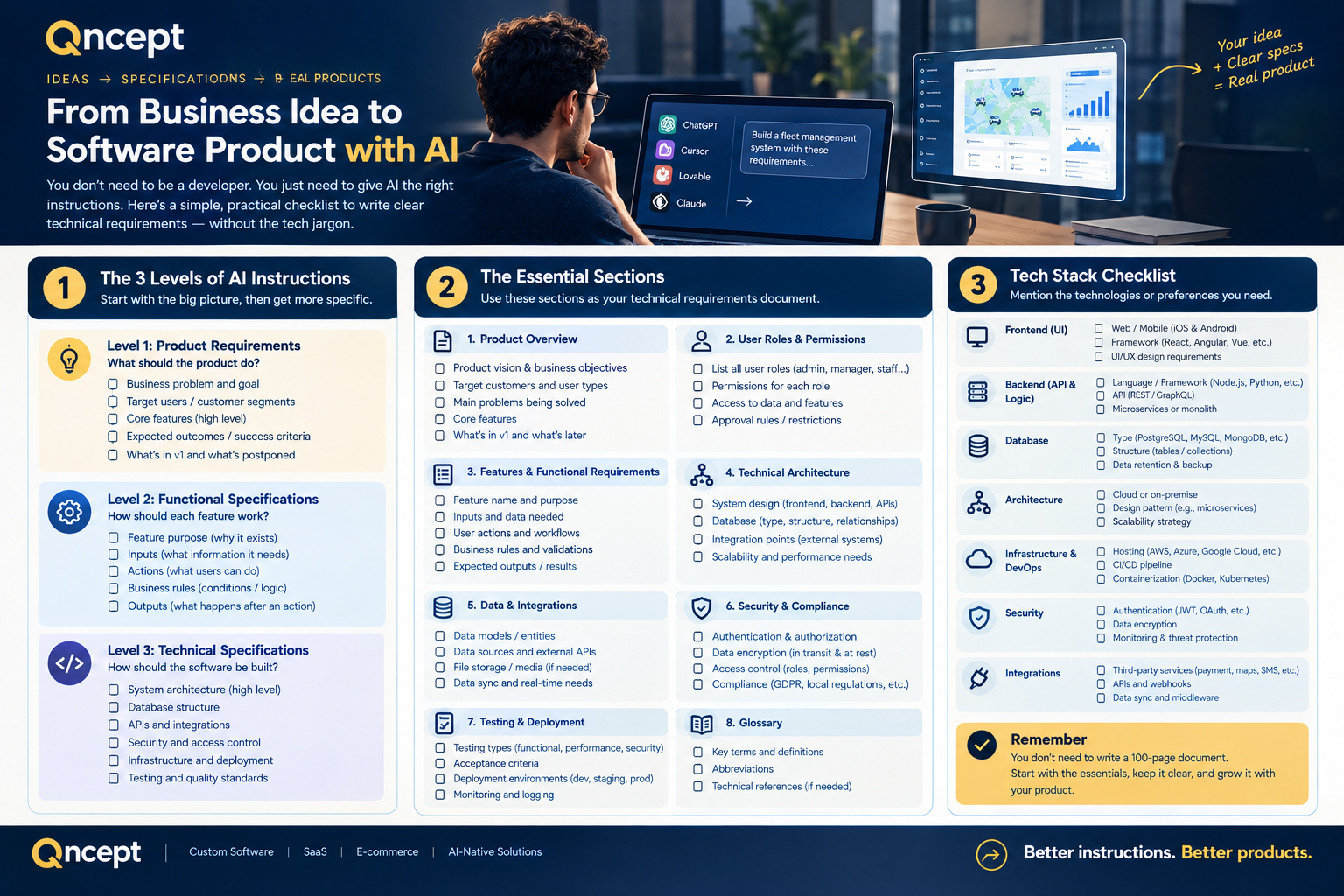
2. The Three Levels of AI Product Instructions
Before writing a detailed specification, understand the three levels of instructions your AI development workflow needs.
Level 1: Product Requirements — What should the product do?
These requirements describe the business problem, target users, features, and expected outcomes.
For example:
"Our fleet management platform should help companies manage vehicles, track operating expenses, schedule preventive maintenance, and monitor vehicle assignments."
You can define these requirements without technical knowledge.
Level 2: Functional Specifications — How should each feature work?
These specifications explain the behavior of individual features and the rules governing them.
For example:
"When a vehicle reaches its next scheduled maintenance date, the system should create an upcoming maintenance alert. Fleet managers can view the alert, open the vehicle record, and create a maintenance work order."
This removes ambiguity about how a feature should behave.
Level 3: Technical Specifications — How should the software be built?
These specifications cover the underlying software structure, including the database, backend, frontend, APIs, security, infrastructure, and testing.
For example:
"Store maintenance schedules and work orders in a relational database. Validate all maintenance records on the backend, enforce organization-level access restrictions, and provide a documented API for retrieving upcoming maintenance."
The key principle: You define the business needs and expected behavior. AI can help propose the technical design, but you should review important architectural and security decisions rather than accepting them blindly.
3. The Essential Sections of a Technical Specification
You do not need to write a 100-page document before building your first version. Start with the following sections and expand them as your product grows.
1. Product Overview
Explain what you are building, who will use it, and what problem it solves.
Include:
Product vision and business objectives.
Target customers and user types.
Main problems being solved.
Core features.
What is included in the first version and what is postponed.
Example: Build a multi-tenant fleet management SaaS platform for companies that need to manage vehicles, maintenance, fuel, expenses, and reporting. Each customer organization must have access only to its own business data.
2. User Roles and Permissions
Define the different users and what each is allowed to do.
For example:
Role
Main permissions
Platform Administrator
Manage customer organizations and platform operations.
Organization Owner
Manage the company's account, users, and subscription.
Fleet Manager
Manage vehicles, maintenance, expenses, and reports.
Staff Member
Perform assigned operational tasks.
Viewer
View permitted information without making changes.
Do not stop at naming roles. Specify the actions each role can perform, the records they can access, and any approval restrictions.
3. Features and Functional Requirements
Describe every core feature separately.
For each feature, specify:
Purpose: Why does it exist?
Inputs: What information does it need?
Actions: What can the user do?
Business rules: What conditions must be followed?
Outputs: What happens after an action?
Permissions: Who can use it?
Exceptions: What happens when something goes wrong?
Example — Vehicle Management
Users can create, view, edit, and archive vehicle records.
Each vehicle has a registration number, make, model, year, VIN, status, and odometer reading.
Required fields must be validated before saving.
Vehicle registration numbers must follow the company's defined uniqueness rules.
Users can view only vehicles belonging to their organization unless explicitly authorized otherwise.
The system must display a useful error when a record cannot be saved.
4. User Workflows
Describe how users move from one step to the next.
For example, a maintenance workflow might be:
The system identifies an upcoming service.
The fleet manager reviews the vehicle and maintenance details.
The manager creates a work order.
An authorized staff member records the completed work.
The system saves the service history and updates the vehicle's maintenance status.
The dashboard reflects the updated information.
A workflow helps AI understand how features connect instead of generating separate screens with no consistent business logic.
5. Data and Database Requirements
Explain what information the product stores and how records relate to one another.
For a fleet management platform, the main records might include:
Organizations
Users and roles
Vehicles
Drivers
Fuel transactions
Maintenance schedules
Work orders
Expenses
Inspections
Notifications
For example, each vehicle belongs to an organization, and each maintenance work order references a vehicle.
You do not have to design every database table yourself. You can ask AI to propose a database schema from your requirements. However, review the relationships, required fields, uniqueness rules, data ownership, and deletion behavior before implementation.
6. System Architecture
Architecture describes the major parts of the application and how they communicate.
A typical SaaS product contains:
Frontend: The screens users interact with.
Backend: The business rules and application logic.
Database: The structured storage for application data.
APIs: The interfaces through which software components communicate.
Authentication: How the system verifies a user's identity.
Authorization: How the system decides what the user can access.
Infrastructure: The services and environments used to run the application.
Integrations: External systems such as payment providers, email services, or mapping tools.
For a multi-tenant SaaS product, the architecture must also enforce separation between customer organizations.
Ask AI to explain its proposed architecture in plain language before asking it to implement the entire application.
7. Security and Data Protection
Security should be specified from the beginning, not added only before launch.
Your requirements should address:
Secure password storage and account recovery.
Role-based permissions enforced by the backend.
Separation of customer data.
Input validation and safe file uploads.
Protection of API keys, passwords, and other secrets.
Appropriate audit logs for important actions.
Backup and recovery requirements.
Data retention and deletion rules.
For example, hiding another organization's vehicles from a user's screen is not enough. The backend must also prevent that user from retrieving those vehicles through an API request.
8. UI/UX Requirements
Explain how the application should look and behave.
Include:
Layout, navigation, colors, typography, and reusable components.
Responsive behavior on desktop, tablet, and mobile.
Forms, tables, filters, search, dialogs, and notifications.
Loading, empty, success, and error states.
Accessibility and language requirements.
References to existing products or screenshots when relevant.
Important: A visually complete screen does not mean the feature is fully implemented. Buttons must perform the correct actions, forms must save valid data, and screens must use the appropriate backend services.
9. Integrations and APIs
Identify external services and explain what information moves between them.
For each integration, specify:
The external service and its purpose.
The data exchanged.
When the integration runs.
Authentication and access requirements.
What happens when the service is unavailable.
Whether retries, logging, or manual recovery are needed.
For example, a payment integration must account for successful payments, failed payments, duplicate requests, and payment status reconciliation.
10. Testing and Definition of Done
Tell AI how to determine whether a feature is complete.
A feature should not be considered finished just because the code has been generated.
A useful checklist includes:
The interface works as expected.
Data is saved and retrieved correctly.
Required validations are implemented.
Permissions are enforced.
Errors are handled safely.
Relevant tests have been executed.
Existing functionality still works.
Documentation is updated where necessary.
Ask AI to distinguish between tests that passed, tests that failed, and tests that could not be executed. It should never claim that a feature works or that tests pass without verification.
4. How to Write Better Prompts for AI
The quality of the result depends on the clarity of your instructions, the context you provide, and how you review the implementation.
Use this practical approach.
Step 1: Explain the product.
Describe your target customers, business problem, and primary objective.
Step 2: Define the scope.
Tell AI exactly what to build now and what to leave for later.
Step 3: Describe workflows and rules.
Explain how users perform tasks, what information is required, and what should happen in normal and exceptional situations.
Step 4: Ask AI to identify gaps.
Before implementation, ask it to list ambiguities, assumptions, missing requirements, and potential risks.
Step 5: Review the proposed design.
Ask AI to explain the architecture, database relationships, security model, and implementation plan in language you understand.
Step 6: Build incrementally.
Implement one foundation or feature at a time, rather than asking AI to generate the entire product in one step.
Step 7: Verify the result.
Test real user workflows and confirm that the implementation meets the specification.
This approach makes it easier to detect mistakes early and reduces the risk of rebuilding large parts of the application later.
5. A Reusable AI Prompt for Non-Technical Founders
The following prompt can be adapted to almost any SaaS product. Replace the bracketed sections with your product information.
Prompt:
"You are a senior software architect and product engineer. Help me transform my business idea into a production-ready software product.
Product information
Product name: [Product name]
Product type: [SaaS, marketplace, CRM, booking platform, etc.]
Target users: [Who will use it]
Business problem: [What problem it solves]
Main objective: [Expected business outcome]
Core requirements
Analyze the product idea and identify the main users, workflows, features, and business rules.
Separate requirements for the first release from future enhancements.
Define user roles and permissions.
Describe each feature, including required data, user actions, validation rules, outputs, and error scenarios.
Map the main user workflows and explain how the features interact.
Propose a suitable database structure and explain the relationships between records.
Recommend an architecture covering the frontend, backend, database, APIs, authentication, authorization, security, and deployment.
Define requirements for data protection, logging, backups, error handling, and testing.
Identify external integrations and explain their dependencies.
Define acceptance criteria for every core feature.
Working rules
Explain technical concepts in plain language.
Do not invent important business rules without documenting your assumptions.
Identify missing information and ask focused questions when answers materially affect the design.
Prefer a maintainable, secure, modular architecture over unnecessary complexity.
Do not treat a visual prototype as a fully working application.
Implement features incrementally.
Inspect the existing code before modifying an existing project.
Run available checks and tests, and report the actual results.
Clearly label anything that has not been verified.
Deliverables
First, produce a Product Requirements Document (PRD), a functional specification, a proposed system architecture, a database design, and an implementation roadmap.
Explain the proposed design and identify unresolved decisions before beginning implementation.
After I approve the requirements and architecture, proceed one phase at a time, verifying each phase before moving to the next."
6. Common Mistakes When Building Products with AI
Mistake 1: Asking AI to build everything in one prompt
A single broad request may generate screens and code without adequately handling the relationships between features.
Better approach: Define the scope, agree on the architecture, and build in manageable increments.
Mistake 2: Focusing only on the interface
A dashboard may look convincing while displaying sample data or using buttons that do nothing.
Better approach: Specify the data source, backend behavior, validation, permissions, and acceptance criteria for every important feature.
Mistake 3: Leaving business rules undefined
Consider a subscription product. What happens when a customer reaches its usage limit? Can an administrator extend the limit? What happens when the subscription expires?
If these rules are missing, AI may make assumptions that do not match your business model.
Better approach: Document important rules and explicitly identify unresolved decisions.
Mistake 4: Ignoring architecture until later
Adding multiple customer organizations, access controls, or complex data relationships after the product has grown can require significant changes.
Better approach: Identify foundational requirements early, especially security, data ownership, database design, and extensibility.
Mistake 5: Assuming generated code is correct
AI can produce incorrect calculations, insecure access rules, incomplete integrations, and code that does not run in the intended environment.
Better approach: Require real tests, inspect critical business logic, and verify important workflows before release.
7. Do You Need a Technical Background?
No. You need enough product understanding to describe the business problem, define the desired behavior, make decisions about priorities, and validate the result.
AI can assist with translating these decisions into technical specifications and code. A qualified engineer or technical reviewer is still valuable for complex architecture, security-sensitive applications, payments, compliance, and production deployment.
The goal is not to become a developer overnight. It is to become better at communicating requirements and evaluating the software that AI produces.
Conclusion
AI is making software development more accessible, but it does not eliminate the need for clear requirements.
The most effective approach is to start with the business problem, translate it into functional requirements, define the technical foundations, and implement the product incrementally.
Your idea tells AI what you want to achieve. Your specifications explain what the product must do. Your testing confirms whether the result actually works.
You do not need to write every line of code or understand every technical detail. You do need to provide the right context, ask the right questions, and make sure the finished product meets your requirements.